Risk Assessment Excel Template S08092304

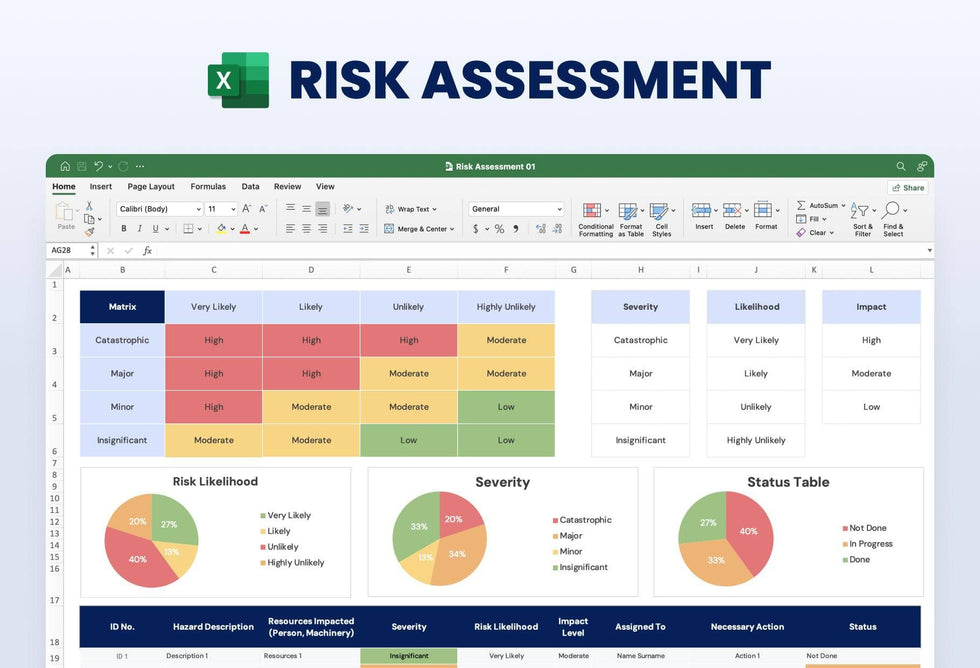
A risk assessment Excel template keeps your hazards and the action on each one in a single sheet. A color-coded matrix shows how severity and likelihood combine into High, Moderate or Low, and three pie charts show how the results split.
What's in the spreadsheet
- A risk matrix from Catastrophic to Insignificant against Very Likely to Highly Unlikely, shaded High, Moderate or Low
- Reference lists for severity, likelihood and impact
- Three pie charts: Risk Likelihood, Severity and a Status Table of Not Done, In Progress and Done
- A risk log with columns for ID number, hazard, resources impacted, severity, likelihood, impact level, owner, action and status
Safety officers and project managers can use it for a site check or a yearly review. Your whole team works from one file.
Start with the risk log at the bottom. Give each hazard an ID, then describe it and name the people or machinery it touches. Next, pick a severity and a likelihood from the lists at the top right, and read the level where they meet on the matrix. That gives you the impact level for the row. Write who the hazard is assigned to and the action you plan. Then set the status and update it as work moves along. The three pie charts sit above the log and show sample shares, so you can update them to reflect your own rows before you share the sheet.
You can keep the whole review in Excel and add as many rows to the log as you need.