Teal Blue Employee Benefit Plan One Page Summary Document


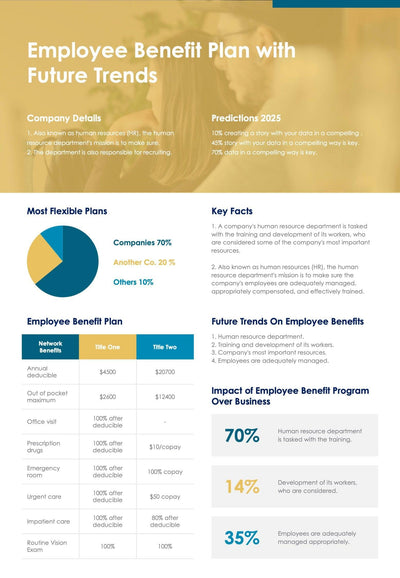
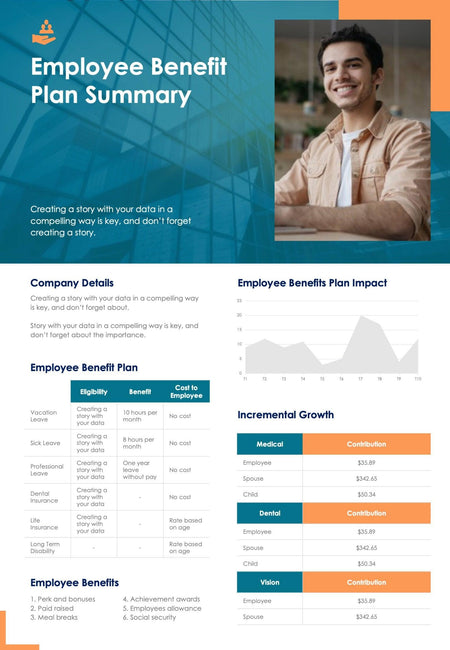
A benefit plan summary document explains your company's employee benefits on one page. A teal photo header with an orange accent opens it, and tables and a chart fill the page below.
What's on the page
- An Employee Benefit Plan Summary header with a photo of a smiling employee
- A Company Details block for a short intro about your business
- An Employee Benefit Plan table with Eligibility, Benefit and Cost to Employee for six types of leave and insurance
- An Incremental Growth table with Medical, Dental and Vision contribution rows
- An area chart for plan impact and a numbered list of six employee benefits
HR teams can hand it to new hires on day one, or send it out before open enrollment so your staff know what they get. It also fits in a job offer pack.
Start with the photo in the header. Swap it for a picture of your own team, then write a two-line intro under the title. In Company Details, add a few lines about your business. The Employee Benefit Plan table lists six kinds of leave and insurance down the left side. For each row, fill in who qualifies and what it costs them. The Incremental Growth tables on the right hold one figure per family member under each plan type. Update the area chart with your own numbers. Then edit the six items in the Employee Benefits list at the bottom.
The figures are samples, so you can replace them with your own plan's numbers in PowerPoint or Keynote.