Blue and Green Business Executive One Page Summary Report Document


Fit a project's details and results on a single page with the blue and green business executive one page summary report. A tall blue side panel carries the company name and three short lists.
What's on the page
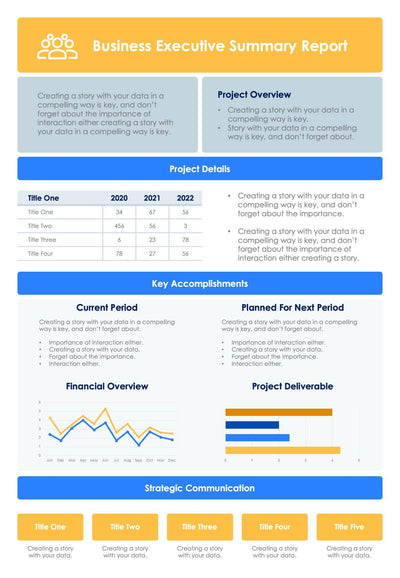
- A side panel with a people-and-chart icon, Company Name, and Company Overview, Information and Financial Information lists
- A Project Details table with five columns, Title One to Title Five, and four rows
- Current Period and Planned For Next Period boxes under Key Accomplishments
- A Financial Overview column chart, mostly dark blue with one green and one light blue bar
- Key Risks in four blocks, Title One to Title Four
Hand it to your board or a client at the end of a quarter. Your reader sees what you finished and what comes next. The finances and risks sit on the same page. Green bands mark each section heading, so you can find any part fast.
Every line of text is placeholder copy. Begin in the side panel with your company name and the three short lists. Then rename Title One to Title Five in the Project Details table and fill its four rows. Under Key Accomplishments, write what you did in Current Period and what you plan in Planned For Next Period. Type your own numbers into the Financial Overview chart, and use the green bar to point out the period you want to stand out. Close with your four biggest risks in Key Risks.
Drop your own figures into the table, chart and lists in PowerPoint or Keynote.