Two Column Table Slide Infographic Template


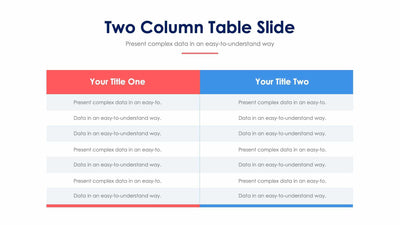
Two numbered lists, one red and one blue, share the two column table slide. Your audience can read across the rows and compare the two.
What's on the slide
- A Two Column Table Slide title with a short subtitle and a red line under it
- A red header marked Title One with a megaphone icon
- A blue header marked Title Two with a stack of coins icon
- Seven numbered rows in each column on a light gray panel
- A folded corner under each header that gives the columns a ribbon look
You can use it to set two plans side by side in a team meeting, or to show two teams and what each one owns. It also works for a before and after list.
Every row holds placeholder text, so type in your own points. Begin at the two colored headers. Give each column a short name in place of Title One and Title Two. Then write one point per row, and keep row one on the left lined up with row one on the right, so your audience can compare them. You may not need all seven rows. Just delete the extras and the panel still looks neat. The megaphone and the coins are easy to swap for icons that fit your topic. You can change the rows for two plans or two teams in PowerPoint, Keynote or Google Slides.