Three Pillar Slide Infographic Template


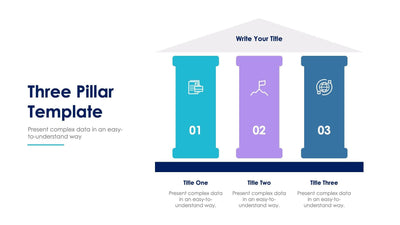
Three ideas behind your plan stand in a simple temple shape on a three pillar slide, with your main title in the roof and one idea on each column.
What's on the slide
- A light gray roof with a Write Your Title label
- Three pillars in teal, lilac and steel blue, each with a small white icon
- A title and a short block of placeholder text on every pillar
- A navy base under the columns and a Three Pillar Template heading at the top
Your company values or the three parts of a program can stand on the columns. Leaders use it to explain a plan in a town hall, and teachers use it to show the main parts of a topic.
Start with the roof. Replace Write Your Title with the name of your plan or the big goal the pillars hold up. Then give each pillar a title, in place of Title One to Title Three, and write two or three short lines under it. The text sits in white on color, so keep it brief. Each pillar has a small line icon at the top. Swap it for an icon that matches the idea, such as a handshake for partners or a globe for reach. The navy base ties the three pillars together. You can rename it too, for example with the value that supports all three. Each pillar can take its own brand color.
You can change the roof and the columns in PowerPoint, Keynote or Google Slides.